Your nightly stock file into Shopify, with bad files stopped
Your store system exports a stock file every night and Shopify has to match it by morning. Doing it by hand is slow, and one bad export can zero out half the shop. This applies the file for you and stops when it looks wrong.
$600 fixed price Get in touch
No sound. Running on sample data: the companies, people and numbers are made up.
What you get
- Shopify stock updated from your file every night, with nobody touching it.
- Only products approved for online sale are changed, at the Shopify location you choose.
- A morning email that says what changed, what didn’t match and what needs a look.
- A report of every change, each one read back from Shopify to confirm it.
What it won’t get wrong
- It won’t wipe your stock with a bad file. An empty file, a file cut off part-way, a renamed column or a file that would send an unusual share of products to zero is stopped, and nothing is written.
- It won’t undo a sale. If an online order lands while it runs, the sale is kept.
- It won’t apply the same file twice. Even if it arrives again under a new name.
- It won’t guess a match. An item number that almost matches a SKU is listed for a person.
What it needs from you
- The folder where the nightly file lands. Google Drive and FTP both work.
- Access to your Shopify store.
- How products approved for online sale are marked.
- A cloud account on your side to run it every night.
In the video
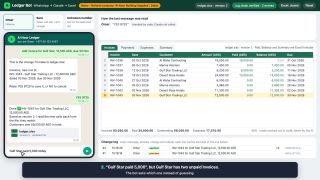
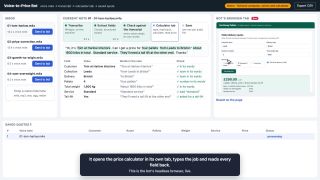
The sample store has a 500,000-row stock file and a week of nights. Night 1 updated 1,142 products. On night 2 an order landed mid-run and the sale was kept. The same file sent again was skipped. A file cut off at 42% of its usual size, a renamed column and a file that would have sent 1,913 products to zero were all stopped. On the night with no file an alert went out.
It runs against a test copy of Shopify that answers the same way the real one does.
Want this, or something like it?
As shown here it costs $600, fixed price. That covers running it on your real file and your store, first in a dry run that writes nothing to Shopify, then going live with the morning summary sent to you. If your version is different, you get a fixed price for yours before any work starts. The code is yours.
Thanks, it's on its way.
If I pick your task, I'll email you.
How Shopify inventory sync works
Where Shopify keeps stock
Every product in Shopify has one or more variants, and stock is counted per variant and per location. A T-shirt in three sizes, sold from a shop and a warehouse, has six separate counts.
Each count has several states. Available is what a customer can buy. Committed is in orders that haven’t shipped yet. On hand is everything physically at the location, including the committed units. A sync almost always sets the available number, because that is the one the online store sells from.
Two settings decide whether the number matters at all. A variant only has a count when “Track quantity” is switched on. And if “Continue selling when out of stock” is on, customers can keep buying below zero, whatever the sync writes.
Each variant can carry a SKU, and that is normally how a row in your stock file finds its product. Shopify doesn’t stop two variants from sharing a SKU, so a sync has to check for that itself.
Four ways to keep Shopify stock in sync
Import a CSV by hand. Shopify admin can export the inventory as a CSV file and import it again with new numbers, under Products, then Inventory. It is free, and fine for a small catalog. Three things make it a poor nightly routine. The file has to be in Shopify’s own layout, which identifies products by handle and option values, so a stock file from another system has to be converted first. The file can’t be larger than 15 MB. And someone has to do it every day.
Use a sync app. Apps in the Shopify App Store can fetch a file from a link, an FTP server or Google Drive on a schedule and map its columns to Shopify. For a simple feed from one supplier this is often the cheapest answer that works, and it is worth trying first. Before you rely on one, ask what it does when the file arrives half-empty. The limits show up with very large files, with rules about which products may be touched, and with checks on the file itself.
Connect it with Zapier or Make. These tools are good at moving one record when something happens, such as a new order. A stock file is thousands of rows at once, and they charge per step, so a nightly file of any size becomes slow and expensive.
Run your own job on the Shopify Admin API. A small program on a timer reads the file, checks it and writes the changes through Shopify’s API. It costs more to set up than an app. It is worth it when the file is large, when a mistake is expensive, or when you have rules an app can’t express. This page is about that option.
What goes wrong with stock files
The file comes from another system, and that system has bad nights.
- The export stops half-way, and every product missing from the file looks sold out.
- Someone renames a column, and the quantities are read as blank.
- A whole category comes through as zero after a stocktake or a crash.
- The same file is delivered twice, or yesterday’s file arrives again under today’s name.
- A spreadsheet program opens the file on the way and strips the leading zeros from item numbers, so 00412 becomes 412 and no longer matches.
- Quantities are negative, because the store system let someone sell what hadn’t been booked in.
Every one of these still looks like a valid file. So the checks have to look at the content. How many rows are there compared with the last good night? Are the columns the expected ones? What share of products would change, and what share would drop to zero? When a check fails, the safe result is to leave Shopify as it was and tell someone.
How the changes reach Shopify
Programs read and change a store through Shopify’s GraphQL Admin API. Two parts of it matter for stock.
The first is reading. Asking for a large catalog page by page takes thousands of requests and runs into Shopify’s rate limits, which give each app a budget of query cost that refills over time. A bulk operation avoids both. The program asks once, Shopify prepares the whole answer in the background, and the result is a file with one line per record.
The second is writing. The program compares the stock file with what it just read and sends only the quantities that differ. On an ordinary night that is a small part of the catalog. The changes go in batches, paced to stay inside the rate limit, and each one is read back afterwards to confirm it arrived.
How overselling happens, and how to stop it
A stock file is a snapshot. It was true at the moment of the export, and the shop keeps selling after that.
Say the file shows 14 of a ring. While the sync runs, a customer buys one, and Shopify drops its count by one. If the sync now writes 14, the ring that was just sold is back on sale. That is overselling. The file was right when it was made. The timing caused it.
Shopify has a guard for this. An update can state the quantity it expects to replace. If the real number has changed in the meantime, Shopify rejects the update and says so. The sync then reads the current number, sees that one was sold and writes 13.
One question is left for your own setup. Do online orders flow back into the store system before the export runs? If they do, the file is already right. If they don’t, orders placed after the export have to be subtracted before the file is applied.
Nightly, hourly or live
Nightly is enough when the store system is the only place stock changes during the day, or when a delay of a few hours does no harm. Hourly makes sense when a shop floor and the website sell from the same shelf.
Live updates are possible when the store system can announce each sale as it happens. A file can’t do that, so it needs a store system that offers it. Even then, a nightly file with a full check is worth keeping, because it repairs anything the live feed missed.
Where it runs
The job needs a computer that is on at the right time. A scheduled job in a cloud account does that with no server to look after. On Google Cloud it is a Cloud Run job started by Cloud Scheduler. The Shopify access key sits in a secret store. The job’s memory of which files it has handled sits in a small storage bucket. An alert fires if a night passes with no run at all.
This one uses no AI. Stock numbers have to be exact, so it is ordinary code, with a test for every case above.