Hardware H.264 Decoding on Fedora 43 and 44 — The Fresh-Install Recipe
Fedora ships codec-free out of the box. Here's the fix to get hardware-accelerated H.264 / H.265 decoding back on a fresh Fedora 43 or 44 install.
Fedora doesn’t ship proprietary codecs — that includes the H.264 / H.265 paths most browsers and video apps reach for first. On a fresh Fedora 43 or 44 install you’ll see Firefox falling back to software decode, ffmpeg refusing to handle MP4s, and vainfo listing only VP8/VP9/AV1.
The fix is three commands.
1. Enable RPM Fusion (free + nonfree)
sudo dnf install -y \
  https://mirrors.rpmfusion.org/free/fedora/rpmfusion-free-release-$(rpm -E %fedora).noarch.rpm \
  https://mirrors.rpmfusion.org/nonfree/fedora/rpmfusion-nonfree-release-$(rpm -E %fedora).noarch.rpm
This adds the two repos that carry codec-enabled rebuilds of Mesa and FFmpeg (the freeworld packages).
2. Swap Mesa to the freeworld VA-API drivers
sudo dnf swap mesa-va-drivers mesa-va-drivers-freeworld
The stock mesa-va-drivers package has H.264 / H.265 / VC-1 stripped out at compile time. The freeworld build re-enables them. This is what unlocks VA-API acceleration on AMD GPUs and on Intel via the Mesa Gallium driver.
3. Replace ffmpeg-free with full ffmpeg
sudo dnf swap ffmpeg-free ffmpeg --allowerasing
ffmpeg-free is a Fedora-built FFmpeg without proprietary encoders/decoders. The RPM Fusion ffmpeg is the upstream build with everything compiled in. --allowerasing is needed because several packages depend on ffmpeg-free and DNF needs permission to swap them transitively.
4. (Intel only) Install the Intel media driver
sudo dnf install -y intel-media-driver
For 8th-gen Intel and newer (including Meteor Lake / Arc). The iHD driver is the modern path and supports H.264, HEVC, VP9, AV1 with hardware encode and decode. On older Intel (pre-Broadwell), use libva-intel-driver instead.
Verify
sudo dnf install -y libva-utils
vainfo
You should now see entries like:
VAProfileH264Main               : VAEntrypointVLD
VAProfileH264High               : VAEntrypointVLD
VAProfileHEVCMain               : VAEntrypointVLD
VAProfileHEVCMain10             : VAEntrypointVLD
If H264 and HEVC show up under VAEntrypointVLD, hardware decode is wired in correctly.
For a quick end-to-end test:
ffmpeg -hwaccel vaapi -hwaccel_device /dev/dri/renderD128 \
       -i some_h264_file.mp4 -f null -
Check the log line for Using auto hwaccel type vaapi — that’s the hardware path being taken.
Browsers
Firefox and Chromium on Fedora pick up VAAPI automatically once the freeworld packages are in place — media.ffmpeg.vaapi.enabled has been true by default since Firefox 96, and Chromium on Fedora ships with the right flags baked in.
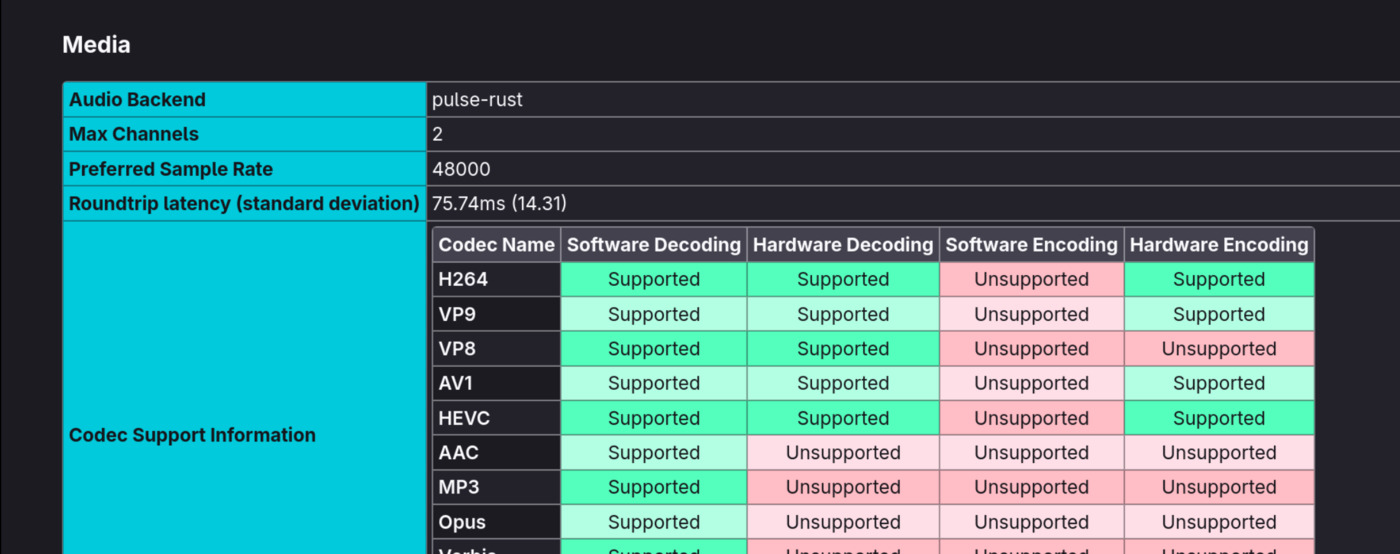
To confirm, open about:support in Firefox or chrome://gpu in Chromium and scroll to Codec Support Information. After the swap, H264 and HEVC flip to Supported under Hardware Decoding:
Why Fedora ships it this way
Fedora’s policy keeps the base distro free of patent-encumbered code. The U.S. patent landscape around H.264 / H.265 doesn’t allow Fedora to distribute decoders directly. RPM Fusion is a third-party project hosted outside that jurisdiction that fills the gap — same packages, just from a different repo.
The four-command setup is essentially the price of having a clean, legally pristine base. Once it’s done, you don’t think about it again.
Tested on Fedora 43 and 44.