I Built a Lightroom Alternative for $0.40 with AI
Adobe Lightroom doesn't run on Linux, and the free alternatives are clunky. So I built my own photo editor with AI, for about $0.40 in tokens.
I have too many hobbies, and one of them is photography. As an amateur photographer, my needs are boring and specific: import raw images from my camera, pick the ones that don’t suck, nudge exposure, contrast, and shadows a bit, then export JPEGs I can share. That’s it. Nothing fancy.
For years, Adobe Lightroom handled that on a Mac, for a monthly subscription. I didn’t love paying every month, but it worked, so I didn’t think much about it.
Then I moved to Linux, and there’s no Adobe there.
The “free alternative” problem
On Linux, the usual suggestions are RawTherapee and Darktable.
RawTherapee is capable, but I found its interface annoying. Darktable is a genuinely impressive piece of software: really powerful, but also complex and confusing. There are YouTube tutorials that walk beginners through a basic Darktable workflow. Those tutorials are about an hour long.
That’s when I asked a different question: why spend an hour setting up a workflow, and more hours learning an unfamiliar tool, when I could build exactly the workflow I need in 30 minutes?
In the past, building a simple photo editor would take me about a week of full time work, including researching RAW image formats, learning libraries that can parse them, researching image manipulation algorithms, and coding everything in C++ using wxWidgets.
But today? A simple LLM can do it in a fraction of the time and I don’t need to waste my brainpower learning stuff I will never need in the future (like what parameters a demosaic function in rawlib needs).
And it’s cheap. You don’t need a frontier Anthropic or OpenAI model for that. DeepSeek V4 Pro is more than enough and it can do all that work for cents, not dollars.
The build
I opened Gritcode, connected it to DeepSeek V4 Pro, and described what I wanted: import images, rate them, adjust a few sliders, save the project, and export JPEGs. No manual coding. Just prompts, with the AI writing the Python (wxPython UI, Pillow and numpy for processing, OpenGL for the preview).
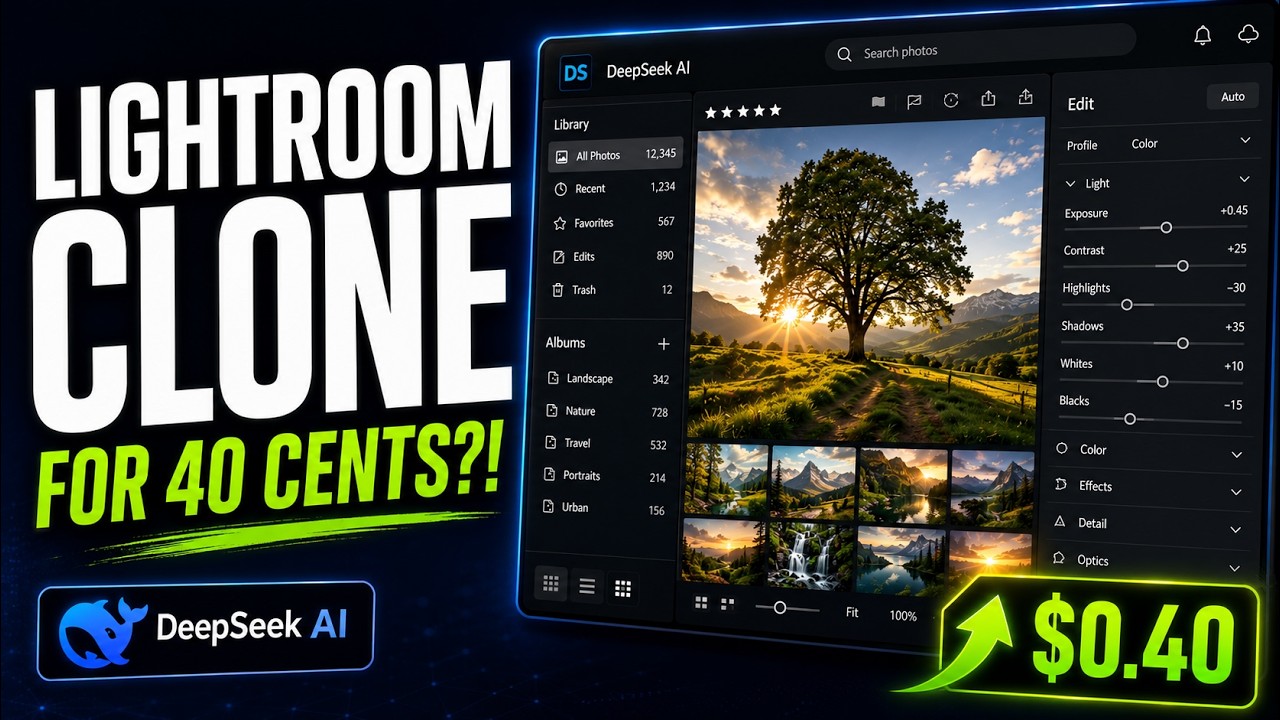
The result is a homemade Lightroom clone. It imports raw images, lets me rate them, tweak exposure, contrast, and shadows, save my adjustments as a project I can reopen later, and export finished JPEGs.
The whole session cost about $0.40 in API tokens. I didn’t write a single line of code myself.
What it is, and what it isn’t
Let me be honest: it’s nowhere near as powerful as Adobe Lightroom.
But here’s the thing: almost nobody uses all of Lightroom. I use maybe 20% of it, and you probably do too. That’s the whole idea behind bespoke software: build the 20% you actually need, and add features as you go.
Want borders on your exports? Ask the AI to add them. Want to post straight to Instagram? Ask it to wire up the Instagram API. Cloud backup? Point it at the Dropbox you already pay for instead of another Adobe subscription.
This is the future
I strongly believe AI is the future of programming, despite sometimes severe pushback from some developers. The models will get better and cheaper, to the point where manual coding will become an obsolete skill, just like punch card programming.
Sure, it will take longer for security-critical software, like in aerospace industry and so on, but this will be an issue of human trust, not model capabilities.
Anyway, I am getting ahead of myself; this is not the topic of this post. The point is that AI enables everybody to build bespoke software, tailored exactly to their need, and the whole process is both cheaper than buying software licenses and faster than learning to use pre-made software products.
What impact it will have on both individual software users and business is yet to be seen. But I am truly excited to explore this and build more software using cheap models, budget hardware and with full transparency: showing you the whole process, all the prompts and agent responses and generated code.
Be sure to subscribe to my Youtube channel to see the builds live. And for session transcripts, prompts and source code, become a Patreon member.