SwiftUI & Metal: Rotating a Triangle with a Slider
Connect a SwiftUI slider to an Apple Metal renderer: pass the value with @State and @Binding, turn it into a float4x4 rotation matrix, and send it to the vertex shader with setVertexBytes.
In the previous part we built a Metal app with SwiftUI. Our MetalView bridges UIKit and SwiftUI, and all the rendering lives in the MTKView delegate, which creates the costly Metal objects once in its initializer and only the lightweight ones in the draw call. That’s all very nice, but the renderer is static. Let’s make it react to the UI.

The full Xcode project is on GitHub.
The plan
We need two things:
- Send changes in the UI state, like the current slider position, to the renderer. For that we use the
@Stateand@Bindingproperty wrappers. - Send the rotation from the renderer to the shaders on the GPU. That’s where uniforms come in.
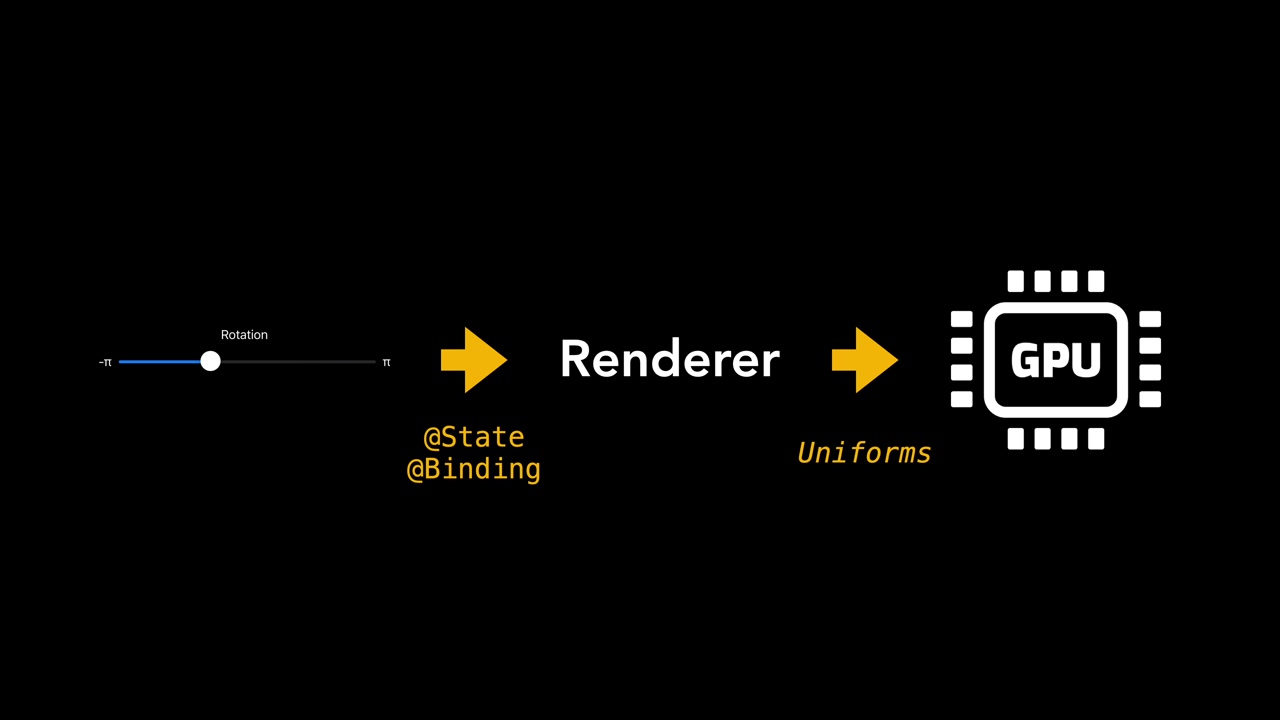
“Uniforms” is a term from OpenGL, where you call functions like glUniform4f to pass small pieces of data to the shaders. Metal has no separate functions for this. We simply use buffers, as you’ll see in a moment.
@State and @Binding
Let’s start with the UI and a state variable for the rotation angle:
@State private var rotation: Float = 0.0
SwiftUI views are very lightweight, and the framework can recreate them at any time for performance reasons. A regular variable could be reset when that happens. With @State, the variable’s lifetime is no longer tied to the view object. SwiftUI keeps it in a separate memory area.
A state variable does more than store data, though. Prefix its name with a dollar sign and you get its projected value, which for @State is a binding. When you change the binding, the state variable changes, and it works the other way too: a change in the state updates the binding. SwiftUI uses this all the time.
Here’s a slider with labels for the rotation range. We pass the binding, $rotation, to the slider, and that’s all it takes to connect the variable and the slider position in both directions:
struct ContentView: View {
    @State private var rotation: Float = 0.0

    var body: some View {
        VStack {
            Spacer()
            MetalView(rotation: $rotation).aspectRatio(1, contentMode: .fit)
            Spacer()

            Text("Rotation")
            HStack {
                Text("-π")
                Slider(value: $rotation, in: -(.pi)...(.pi))
                Text("π")
            }
            Spacer()

            Button("Reset") {
                rotation = 0.0
            }
        }
    }
}
Watch the Reset button. Its callback only sets the property to zero, and because the slider is connected to the same property through a binding, the slider moves back on its own. There’s no need for event handlers or view controllers. It works the other way around too: when you move the slider, the state updates. You can check it by printing the value in an .onChange(of: rotation) modifier.
Passing the angle to the renderer
MetalView gets the same binding, so it’s updated every time the rotation changes:
@Binding var rotation: Float
MetalView bridges SwiftUI and UIKit with UIViewRepresentable. Every time the view needs a refresh, SwiftUI calls updateUIView (or updateNSView on the Mac). Both call one function, and that’s where we hand the current angle to the renderer:
private func updateMetalView() {
    renderer.updateRotation(angle: rotation)
}
#if os(iOS)
extension MetalView: UIViewRepresentable {

    func makeUIView(context: Context) -> some UIView {
        makeMetalView()
    }

    func updateUIView(_ uiView: UIViewType, context: Context) {
        updateMetalView()
    }
}
#elseif os(macOS)
extension MetalView: NSViewRepresentable {

    func makeNSView(context: Context) -> some NSView {
        makeMetalView()
    }

    func updateNSView(_ nsView: NSViewType, context: Context) {
        updateMetalView()
    }
}
#endif
If you first implement updateRotation in the renderer with just a log message, you can see the renderer get the right angle as you drag the slider.
A rotation matrix
Now the angle has to get to the shader. We do it with a matrix. If you don’t know matrices, think of them as a compact and efficient way to do a series of multiplications and additions. Rotating a point around the Z axis changes its X and Y coordinates:
x' = x·cos(angle) − y·sin(angle)
y' = x·sin(angle) + y·cos(angle)
z' = z
Multiplying a 4×4 rotation matrix by the position vector gives you exactly that. We extend the float4x4 type with initializers for rotations around the X, Y and Z axes:
import simd

extension float4x4 {
    init(rotationX angle: Float) {
        self = float4x4(
            [1, 0, 0, 0],
            [0, cos(angle), sin(angle), 0],
            [0, -sin(angle), cos(angle), 0],
            [0, 0, 0, 1]
        )
    }

    init(rotationY angle: Float) {
        self = float4x4(
            [cos(angle), 0, -sin(angle), 0],
            [0, 1, 0, 0],
            [sin(angle), 0, cos(angle), 0],
            [0, 0, 0, 1]
        )
    }

    init(rotationZ angle: Float) {
        self = float4x4(
            [cos(angle), sin(angle), 0, 0],
            [-sin(angle), cos(angle), 0, 0],
            [0, 0, 1, 0],
            [0, 0, 0, 1]
        )
    }
}
Note that each array here is a column, not a row. simd matrices are column-major, so the code looks like the transposed matrix you’d see in a math book.
Sending the matrix to the shader
In the renderer, a private variable holds the current rotation matrix. It starts as the identity matrix, and we rebuild it whenever the slider sends a new angle:
private var rotationMatrix = matrix_identity_float4x4

func updateRotation(angle: Float) {
    rotationMatrix = float4x4(rotationZ: angle)
}
The vertex function gets a new parameter for the matrix and uses it to transform the position:
vertex FragmentInput vertex_main(Vertex v [[stage_in]],
                                 constant float4x4 &matrix [[buffer(1)]]) {
    return {
        .position { matrix * v.position },
        .color { v.color }
    };
}
Back in the renderer’s draw method, one line sends the matrix with setVertexBytes, which creates the Metal buffer for us. The vertices are at index 0, so the matrix goes to index 1:
renderEncoder.setRenderPipelineState(pipelineState)
renderEncoder.setVertexBuffer(vertexBuffer, offset: 0, index: 0)
renderEncoder.setVertexBytes(&rotationMatrix, length: MemoryLayout<simd_float4x4>.stride, index: 1)
renderEncoder.drawPrimitives(type: .triangle, vertexStart: 0, vertexCount: 3)
And that’s it. The slider now controls the rendering through a SwiftUI binding:
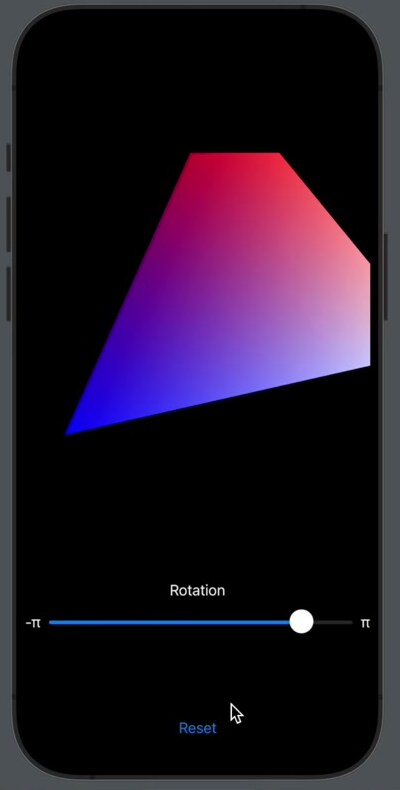
The corners get cut off because the triangle now reaches outside the view’s coordinate range, from −1 to 1 on each axis.