Vertex Descriptors in Apple Metal: Attributes, Offsets and Indexed Drawing
Use MTLVertexDescriptor so your Swift and Metal vertex structs don't have to match, calculate attribute offsets the right way with MemoryLayout.offset(of:), and draw a square from four vertices with an index buffer.
In the previous part we drew a colored triangle from a Swift struct with a position and a color, and the shader declared a matching struct. The field types and their order had to match exactly on both sides. Vertex descriptors lift that restriction. Let’s take a look.

The full code is on GitHub, with a playground page for each step.
The vertex descriptor
We keep the same struct on the Swift side, the same vertex array and the same vertex buffer. What’s new is the MTLVertexDescriptor:
let vertexDescriptor = MTLVertexDescriptor()

vertexDescriptor.attributes[0].format = .float2
vertexDescriptor.attributes[0].bufferIndex = 0
vertexDescriptor.attributes[0].offset = 0

vertexDescriptor.attributes[1].format = .float3
vertexDescriptor.attributes[1].bufferIndex = 0
vertexDescriptor.attributes[1].offset = MemoryLayout<Vertex>.offset(of: \.colorRgb)!

vertexDescriptor.layouts[0].stride = MemoryLayout<Vertex>.stride
It has an array of attributes. Attribute 0 is the position from our struct and attribute 1 is the color. The format of each matches the type of its field.
Both attributes have a buffer index of 0. You can take different attributes from different buffers, but here we use a single buffer with interleaved data, so they all come from buffer 0.
Attribute offsets
The offset is where it gets interesting, and it’s the part I see people get wrong most often. Here’s how our vertex array is laid out in memory:
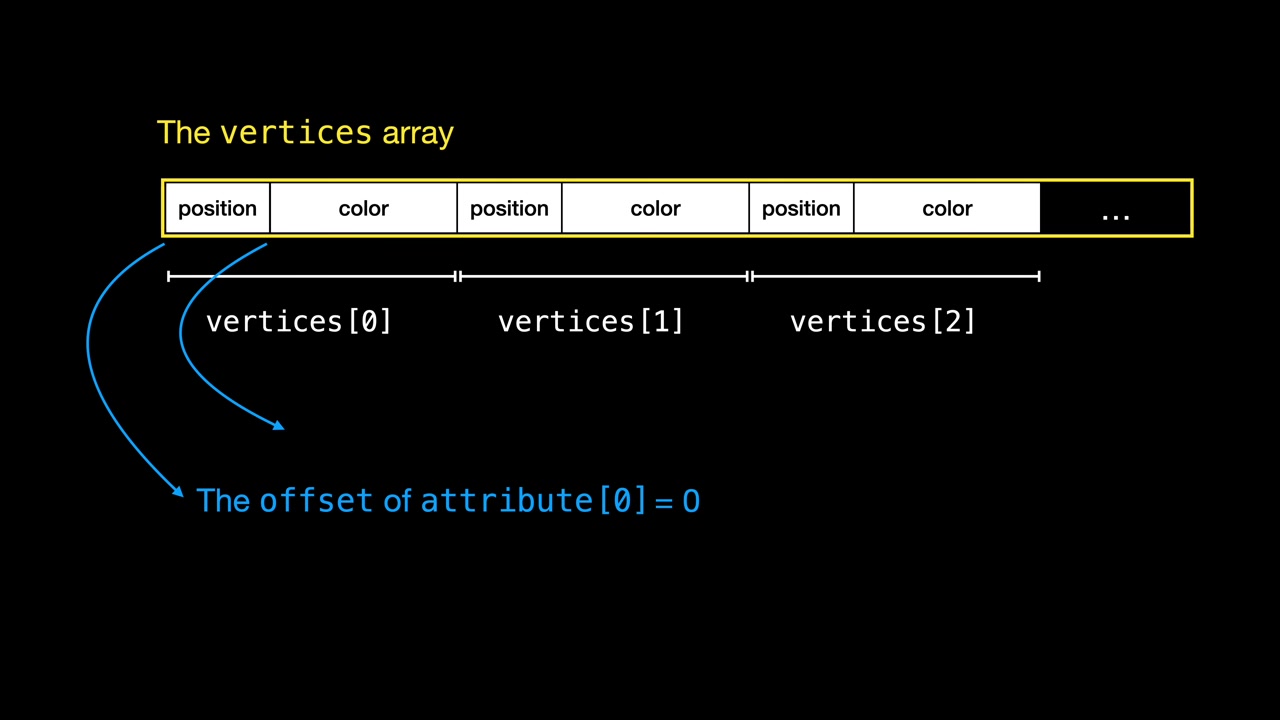
Each vertex takes the same number of bytes. The real layout doesn’t have to look exactly like this picture, because the system can add padding for performance. Either way, the offsets are relative to the start of each vertex. So the position’s offset is always 0, since the position is at the beginning of the vertex.
But where does the position end and the color start? You’ve probably seen code that uses the size or stride of the previous field. That doesn’t always work, because Swift can pad structs to keep the data aligned. I’ll show you an example below. For now, trust me: the correct way is MemoryLayout<Vertex>.offset(of:).
The index in the layouts array is a buffer index too. We only use buffer 0, so we set its stride to the stride of the whole Vertex struct. That’s how Metal knows where the next vertex starts after it has read all the attributes.
The shader side
The shader needs a few changes. The vertex struct gets attribute annotations, and the vertex function no longer takes an array and an index. It takes a single vertex:
struct Vertex {
    float2 position [[attribute(0)]];
    float3 color [[attribute(1)]];
};

struct FragmentInput {
    float4 position [[position]];
    float4 color;
};

vertex FragmentInput vertex_main(Vertex v [[stage_in]]) {
    return {
        .position { float4(v.position, 1.0, 1.0) },
        .color { float4(v.color, 1.0) }
    };
}

fragment float4 fragment_main(FragmentInput input [[stage_in]]) {
    return input.color;
}
Thanks to [[stage_in]], the Metal pipeline prepares the vertex for each call of this function, following our vertex descriptor.
Finally, we set the vertex descriptor in the pipeline:
pipelineDescriptor.vertexDescriptor = vertexDescriptor
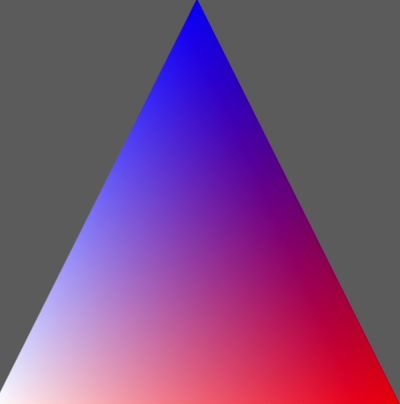
Run it, and here’s our triangle, the same as with plain buffers:
The structs don’t have to match anymore
With vertex attributes, the Swift and Metal structs no longer need to match exactly. You can change the field order in the shader, and Metal still matches the fields correctly through the attribute annotations.
You can even change the types. Here the shader uses float4 for both fields, which simplifies the vertex function, while the Swift struct still has a float2 position and a float3 color:
struct Vertex {
    float4 color [[attribute(1)]];
    float4 position [[attribute(0)]];
};

vertex FragmentInput vertex_main(Vertex v [[stage_in]]) {
    return {
        .position { v.position },
        .color { v.color }
    };
}
When Metal maps a smaller vector to a larger one, it sets Z to 0 and W to 1.
When the offset goes wrong
Now let’s do something unusual that shows the problem with offsets. We replace the SIMD2<Float> position with two separate floats:
struct Vertex {
    let x: Float
    let y: Float
    let colorRgb: SIMD3<Float>
}
The vertex descriptor still maps it correctly, because two consecutive floats look like a float2 to Metal. But the color comes after two floats, so you might think its offset is simply the size of two floats:
vertexDescriptor.attributes[1].offset = MemoryLayout<Float>.stride * 2
You see this code everywhere: people skip over the previous fields to get the offset. Usually the fields are vectors of 3 or 4 floats, which have the same stride, so it works. This case is different. Run it, and the colors are all wrong:
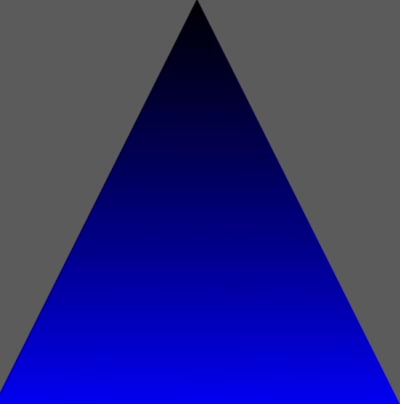
The two floats take 8 bytes, but because of padding the color starts at byte 16. A SIMD3<Float> is aligned to 16 bytes. With an offset that’s too small, Metal reads the zeros in the padding as color data. You can check it with a quick print:
print("Two floats stride: \(MemoryLayout<Float>.stride * 2) vs offset of colorRgb: \(MemoryLayout<Vertex>.offset(of: \.colorRgb)!)")
// Two floats stride: 8 vs offset of colorRgb: 16
Going back to offset(of:) fixes the problem.
Indexed drawing
Last but not least, indexing. It’s the standard way to make a vertex buffer smaller. Take a square: it’s two triangles, which would normally need six vertices. With indices, we use only four and refer to them by number. Vertices 0, 1 and 2 make the first triangle, and vertices 3, 0 and 2 the second:
let vertices: [Vertex] = [
    Vertex(x: -1, y: 1, colorRgb: [0, 0, 1]),
    Vertex(x: -1, y: -1, colorRgb: [1, 1, 1]),
    Vertex(x: 1, y: -1, colorRgb: [1, 0, 0]),
    Vertex(x: 1, y: 1, colorRgb: [0, 0, 0]),
    ]

let indices: [UInt16] = [
    0, 1, 2,
    3, 0, 2]
The vertex buffer is created like before. The new thing is the index buffer, created the same way, with the index type used to calculate its size:
guard let indexBuffer = device.makeBuffer(bytes: indices,
                                          length: MemoryLayout<UInt16>.stride * indices.count,
                                          options: []) else {
    fatalError("Could not create the index buffer")
}
The rest of the code stays the same until the draw call. We replace drawPrimitives with drawIndexedPrimitives and pass it the index buffer:
renderEncoder.drawIndexedPrimitives(type: .triangle,
                                    indexCount: indices.count,
                                    indexType: .uint16,
                                    indexBuffer: indexBuffer,
                                    indexBufferOffset: 0)

In the next part, we leave playgrounds behind and build a real SwiftUI app for the iPhone and the Mac.